
Construction Master Pro Calc
Calculated IndustriesTools
4.71.68K Reviews
- Version
- 10.20.18
- Installs
- 100.00K
- Age Rating
- Everyone
Screenshots
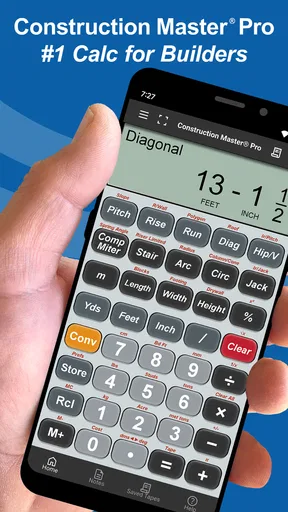
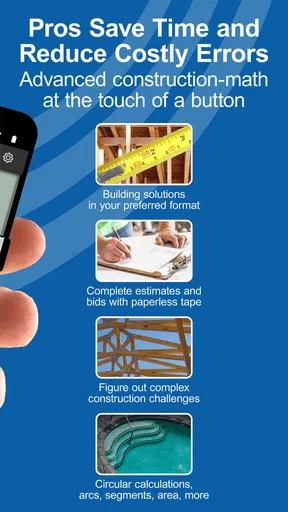

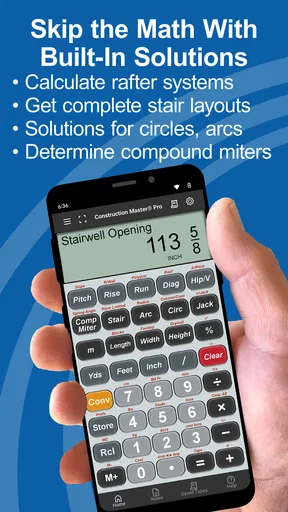
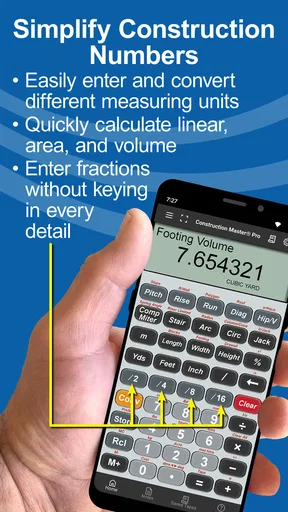
Our Review of Construction Master Pro Calc
 Analysis by Appyee
If you've ever found yourself knee-deep in construction plans and struggling with calculations, then Construction Master Pro Calc might just be your new best friend. I decided to take this app for a spin, and let me tell you, it's like having your very own construction calculator right in your pocket. Let's dive into what makes this app a must-have for anyone in the construction field.
What the free download means in practice
The app is a free Tools download from Calculated Industries, which makes it easy to try before deciding whether it belongs in your regular workflow. That does not mean every part of the experience is free: in-app purchases range from $0.49 to $39.99 per item. I would treat the free access as a chance to check whether its construction-focused approach suits your work, then review any purchase details in the app before paying. The available price range alone does not tell me which item is right for a particular user, so I would not assume that a purchase is necessary for every calculation.
Its 4.7 average from around 9,400 ratings, alongside about 1,600 written reviews and over 100,000 installs, suggests that many people have found a reason to keep using it. Those figures are useful context, but they cannot tell you whether its button layout or calculation style will feel natural to you. It is rated for Everyone, and the app has been available since December 13, 2010; its current version is 10.20.8, with iOS 12 as the stated minimum operating system. I’d check compatibility and the in-app purchase screen on the device you plan to use rather than making a decision from popularity alone.
The Ultimate Calculator for Construction Pros
First things first, the Construction Master Pro Calc app is designed with professionals in mind. This isn’t your run-of-the-mill calculator. It's specifically tailored for construction projects, making it ideal for contractors, architects, and builders who need precise measurements and calculations on the fly.
Features That Stand Out
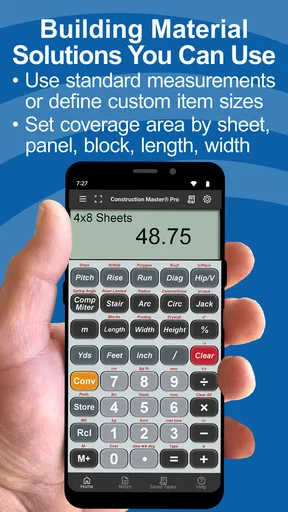
One of the first things I noticed is the app’s clean and intuitive interface. It’s not cluttered, which is a relief because when you’re in the middle of a project, the last thing you want is to sift through unnecessary options. The app offers a range of functions like stair calculations, rafter lengths, and even area and volume conversions. It’s like having a Swiss Army knife for construction math.
Another feature worth mentioning is the dimensional math and conversions. You can easily switch between feet, inches, fractions, and metric units. This is incredibly handy when you're working on international projects or need to communicate with teams using different measurement systems.
Putting construction math to work
The real advantage of a specialist calculator becomes clearer when a job involves several connected measurements rather than a single total. For example, while planning a small set of steps, I might need to work through dimensions, check a stair calculation, and then communicate the result in the unit format someone else is using. Keeping those tasks in one construction-oriented tool can reduce the mental switching between a general calculator, a conversion site, and a paper note.
A practical habit is to enter one part of a job at a time and pause to check the displayed units before moving on. That matters when a plan uses feet and inches but a supplier or colleague talks in metric. The app’s dimensional conversions help bridge that gap, but they do not remove the need to confirm what a measurement represents. I’d label or note the purpose of a result outside the calculator when several rooms, openings, or cut lists are involved; a correct figure attached to the wrong location is still a costly mistake.
It is also useful to think of the calculator as a way to check your working, not as a substitute for reading plans or measuring the site. If I were estimating material, I would keep the underlying dimensions visible and verify any assumptions about waste, layout, or site conditions separately. That workflow is more dependable than treating a quick result as a complete purchasing list, especially when an odd corner or an existing structure changes the real measurements.
Ease of Use
Now, let's talk usability. The app is user-friendly, even for those who might not be tech-savvy. The layout is straightforward, and each function is clearly labeled. I appreciated the step-by-step prompts for more complex calculations, which guide you through the process. It's like having a helpful assistant right there with you.
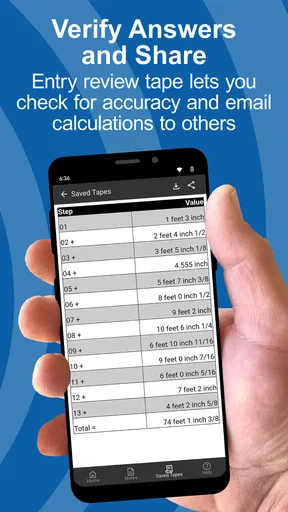
One cool aspect is the ability to save calculations. This means you can revisit them later without having to redo anything. It’s a real time-saver when you're managing multiple projects.
Where it fits beside ordinary calculators
A standard phone calculator is still the quickest choice for everyday arithmetic, and it may be all you need for a basic sum or a simple percentage. The difference here is the construction-specific way of handling dimensions, fractions, conversions, and tasks such as stairs or rafters. Rather than repeatedly translating measurements by hand, you can work in a format closer to the one used on a job.
That focus is also a trade-off. Someone who only occasionally measures a shelf or totals a few receipts may find a general calculator simpler, while a person who wants a visual drawing, project schedule, materials database, or shared team workspace should look for a tool built around those needs. This app is best understood as a calculation aid, not a full construction-management system. I’d choose it when the calculations themselves are the bottleneck, and choose another kind of app when plans, collaboration, or job tracking matter more.
If you are new to construction math, the prompts can make a task less intimidating, but I would still learn what each input means instead of tapping through by habit. Take a familiar measurement and test the process before relying on it under time pressure. That small practice run helps you spot whether you have entered a rise, run, length, or unit incorrectly, and gives you more confidence when a real project gets busy.
Performance and Reliability
Performance-wise, the app runs smoothly without lagging, which is essential when you're on a tight schedule. I tested it on both Android and iOS devices, and it performed consistently well on both platforms. The app's reliability is another feather in its cap. During my usage, I didn’t encounter any crashes or bugs, which is always a relief.
Even a responsive calculator depends on careful inputs. I would make a quick second check before using a result for a cut or order, particularly if a measurement has been converted or entered as a fraction. Saving a calculation can help with revisiting work, but it is not the same as a complete project record: keep any important job notes, plan references, and context somewhere you can identify later. That is a modest extra step, but it prevents a useful saved number from becoming mysterious when you return to it days later.
Who Should Use It?
While Construction Master Pro Calc is perfect for professionals, it’s also a great tool for DIY enthusiasts. If you're someone who loves tackling home renovation projects, this app can help you get your measurements and calculations spot-on, saving you from potential headaches down the road.
I can picture using it during a weekend renovation when I need to check a set of stair dimensions or work out an area before buying materials. Instead of stopping to convert every measurement manually, I could calculate, confirm the units, and keep the result for reference while comparing it with the site. For a homeowner doing one project, that convenience may be worth more than learning a broad set of construction formulas from scratch.
It is less compelling if your needs are mostly casual arithmetic, or if you expect an app to tell you what to build and how to meet every site requirement. A calculator can help with the numbers, but it cannot inspect a structure, validate a design, or decide whether a proposed measurement is safe and appropriate. I would use it alongside sound plans and professional advice whenever the work calls for them.
Final Thoughts
In a world where precision is key, Construction Master Pro Calc stands out as a reliable and efficient tool for anyone in the construction industry. Its robust features, combined with its ease of use, make it an indispensable app for both seasoned pros and aspiring builders. If you’re looking to streamline your calculations and boost your project efficiency, downloading this app might be one of the best decisions you make.
So, go ahead and give it a try. You might just find it becomes your go-to app on the job site. Happy building!
My buying advice is to start with the free download and see whether the construction-specific workflow genuinely saves you time. If it does, consider the in-app purchase options only after checking what each one provides and whether you need it; if a basic phone calculator already handles your occasional sums, there is no reason to add complexity. For regular dimensional work, the combination of construction calculations, unit handling, and saved results makes this a practical tool to test. I’d recommend it to builders and hands-on renovators who want a focused calculator, while anyone seeking a broader planning or design app should look elsewhere.
Verdict
Strengths of Construction Master Pro Calc
- Highly accurate construction calculations.
- Intuitive interface for quick use.
- Comprehensive unit conversions.
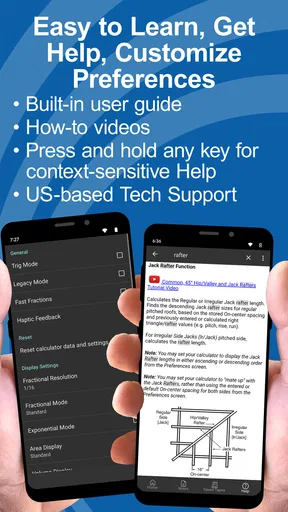
- Customizable settings for preferences.
- Supports complex construction math.
Limitations of Construction Master Pro Calc
- Can be overwhelming for beginners.
- Limited trial version features.
- No real-time collaboration tools.
- Requires manual data entry.
- Interface feels dated on some devices.
Other Releases by Calculated Industries
View All
Construction Master 5 Calc
Tools4.7

Pipe Trades Pro Calculator
Tools4.8

Real Estate Master IIIx Calc
Business4.7

Qualifier Plus IIIx
Business4.8
Similar Picks in This Category
View All
Google LLC4.0

Gboard - the Google Keyboard
Google LLC4.5

Google Play services
Google LLC4.3

Google Play Store
Google LLC4.9

Files by Google
Google LLC4.5

SHAREit: Transfer, Share Files
Smart Media4U Technology Pte.Ltd.4.3
Frequently Asked Questions
What features make the Construction Master Pro Calc stand out from other construction calculators?
The Construction Master Pro Calc is designed specifically for construction professionals, offering features like advanced feet-inch-fraction math, right angle calculations, and complex roofing calculations. It also provides solutions for stair layouts, circular calculations, and concrete volumes, making it a versatile tool for various construction projects.
Is the Construction Master Pro Calc user-friendly for beginners in construction?
Yes, the app is designed with a user-friendly interface that caters to both beginners and seasoned professionals. It includes an intuitive keypad and clear function labeling, ensuring that users, regardless of experience level, can efficiently navigate and utilize the app’s robust features.
Does the app require an internet connection to function effectively?
No, the Construction Master Pro Calc does not require an internet connection to perform calculations. This offline functionality ensures that users can access all features and perform essential construction calculations even in remote areas without internet access.
How does the Construction Master Pro Calc handle unit conversions?
The app excels in unit conversions, allowing seamless switching between various measurement units such as feet, inches, meters, and centimeters. This flexibility is crucial for professionals working on projects that involve different measurement standards, ensuring precision and convenience.
Is there customer support available if I encounter issues with the app?
Yes, the app offers comprehensive customer support, including a detailed user guide and responsive support team. Users can access help directly through the app or via the official website, ensuring any technical issues or questions are promptly addressed.
